YouAnalytics / Agency Google Analytics report
Agency Google Analytics report in WordPress
A screenshot-ready WordPress GA4 report for clients and investors: one page, selected properties, no Google account invite. Say out loud that combined users are sums, not unique people.
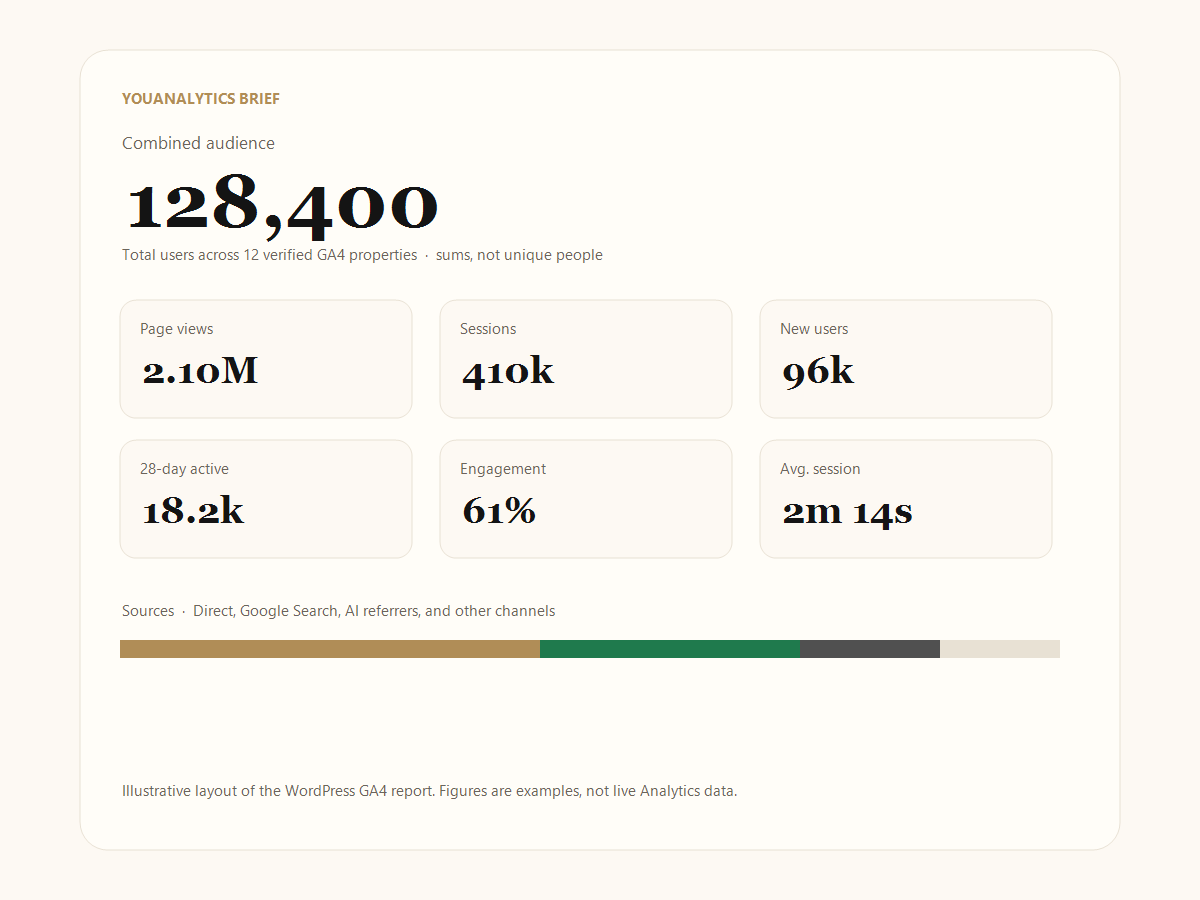
Key takeaways
- Print or Save as PDF from Brief. You do not need to invite the client to Google Analytics.
- Say on the call that combined users are sums, not unique people.
- PIN locks Last 28 days and property cards; lifetime can stay visible.
- Sparklines are decorative. Quote the numbers and the snapshot time, not the squiggles.
How do I share Google Analytics with investors without giving account access?
Open Brief (chrome-free). Print or use the browser’s Save as PDF. They see the verified snapshot, not your Google account, property settings, or Realtime.
That matters in a pitch: inviting an investor as an Analytics viewer also invites them into every other property that account can see, plus the temptation to change views. A PDF is a bounded artifact. You can also place the brief on a private WordPress page with [youanalytics] (administrators only) if the client already logs into that WP site.
Can I print or export a Google Analytics report for a pitch deck?
Yes. That is what the fullscreen brief is for. Use Lifetime for a stable headline number, or Last 28 days when you want a recent window. Browser print → Save as PDF is enough; there is no separate export file type.
Crop the screenshot after print preview if the page is longer than one slide. The layout is meant to read as one cream brief, not as wp-admin.
How do I lock Last 28 days analytics behind a PIN?
In YouAnalytics → Connection, set a PIN of 4 to 8 digits. Lifetime combined audience stays visible. Last 28 days and per-property cards stay behind the PIN so a lobby screen, conference laptop, or shared agency desk does not leak the recent mix.
The PIN is a hash stored in WordPress, not your Google password. Disconnecting Google does not require the PIN; the PIN only gates parts of the brief UI.
What is on the brief
- Combined audience (lifetime and last 28 days)
- Page views, sessions, new users, 28-day active, engagement, average session
- Sources: Direct, Google Search, AI referrers (ChatGPT and similar), social, and others
- Each selected property, with primary and secondary callouts
There is no revenue line. Totals are the sum of each property, not unique people. If you need unique users across brands, that is a GA4 360 roll-up. How the three options differ: combine multiple GA4 properties.
What to say when you present the numbers
Read the note on the brief: combined users are not unique people. A useful line for a client call is “this is every selected site added together; someone who used two sites is in both counts.” If they need one human counted once, that is a 360 conversation, not a plugin setting.
Skip roll-up and subproperties in the picker so you do not present the same traffic twice. Failed properties show as unavailable — better a gap than a confident zero.
Where do ChatGPT and other AI referrers show up?
On the brief, under Sources, in the AI bucket — next to Direct, Google Search, and other channels. That grouping is YouAnalytics classifying known AI hosts. It is not a new default channel inside Google Analytics itself. In the GA4 UI you still see those hosts as referrers unless you have mapped them.
How often does GA4 data refresh in this WordPress plugin?
Every six hours from Google Analytics, plus a manual refresh. The brief marks the snapshot time. Do not treat it as Realtime. Both Lifetime and Last 28 days end at yesterday in each property’s time zone — not this morning’s Realtime. If a property was just tagged today, wait until Analytics itself has a complete day: how to add Google Analytics to WordPress.
Checklist before you send the PDF
- Roll-up and subproperties are unticked.
- Staging and dead brands are unticked.
- No property is sitting as unavailable unless you will explain the gap.
- You know whether the slide shows Lifetime or Last 28 days.
- You will say “sum of each site,” not “unique users.”
- You are not comparing the PDF to Realtime from today.
- Revenue is not on this brief — do not promise it in the email.
- The snapshot time on the brief matches the story you are telling (“through yesterday,” not “live right now”).
Caption you can paste under the slide
Combined Google Analytics 4 totals for the selected properties, through yesterday in each property’s reporting time zone. Users, page views, and sessions are sums — a person who used two sites is counted twice. Engagement is session-weighted. Figures are a verified snapshot, not Realtime, and not a GA4 360 unique-user roll-up.
Frequently asked questions
How do I share Google Analytics with investors without giving account access?
Open Brief, then print or save PDF. You do not need to invite them to the Google account.
Can I print or export a Google Analytics report for a pitch deck?
Yes. Screenshot, print, or Save as PDF from the browser.
How do I lock Last 28 days analytics behind a PIN?
Set a 4–8 digit PIN in YouAnalytics → Connection. Lifetime stays visible; Last 28 days and property cards wait for the PIN.
How often does GA4 data refresh in a WordPress plugin?
Every six hours from Google Analytics, and you can refresh manually.
Where do ChatGPT and other AI referrers show up in GA4?
On the YouAnalytics brief, under Sources, in the AI bucket.
Are the charts on the agency brief live GA4 trends?
No. Sparklines are decorative. Quote the numbers and the snapshot time.
First connect Google (read-only): connect Google Analytics to WordPress. Choose plugins by job: best Google Analytics plugin for WordPress.