GA4 WordPress plugin · MIT · by Roktim saha
YouAnalytics – Google Analytics WordPress plugin for all your GA4 properties
One verified brief across the Google Analytics 4 properties you select: combined audience, page views, sessions, and sources. Totals are sums, not unique people. If you only need to put GA4 on one WordPress site, start with Site Kit instead.
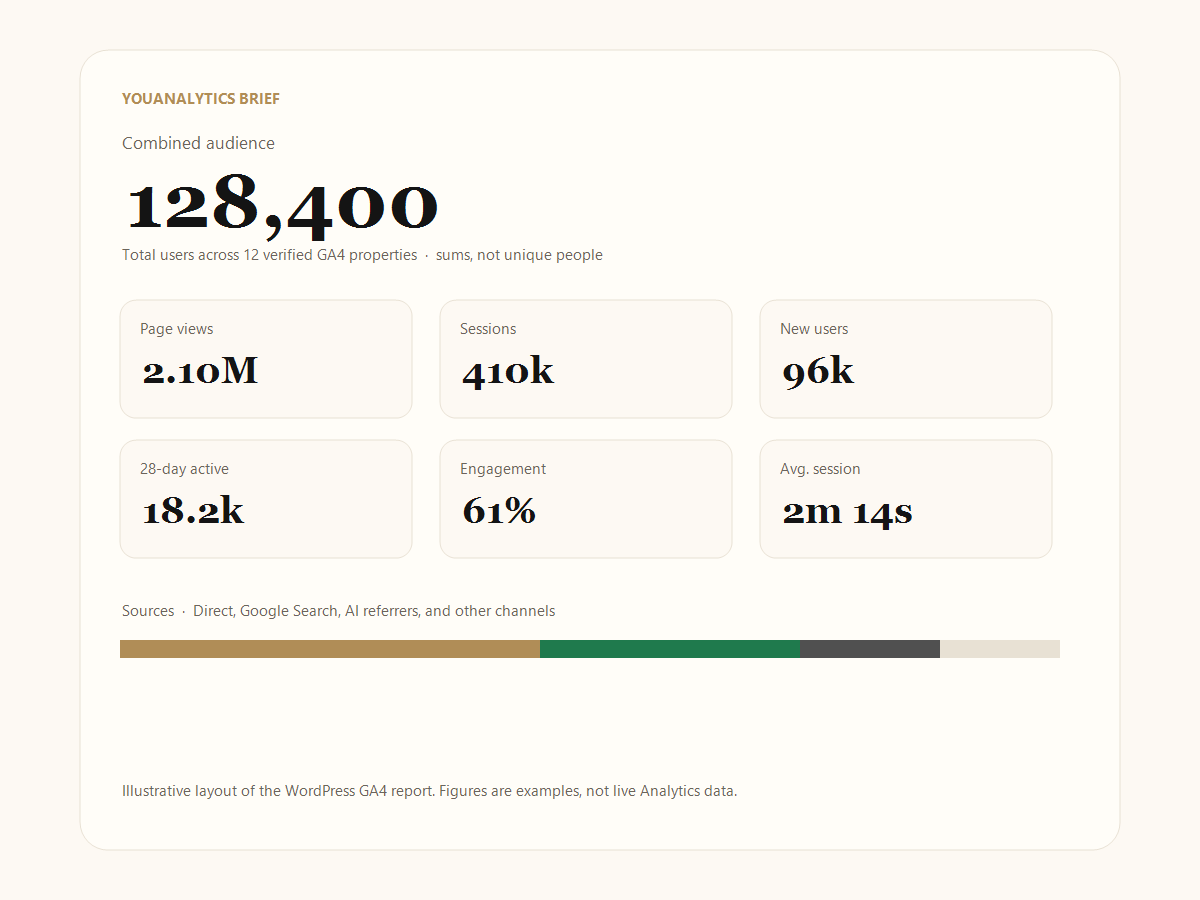
Key takeaways
- YouAnalytics is a Google Analytics WordPress plugin that reads selected GA4 properties. It does not add the tracking tag.
- Combined users, page views, and sessions are sums. Combined engagement and average session are session-weighted, not a simple average of rates.
- The sparklines on the brief are decorative. They are not extra GA4 time-series.
- Lifetime is 14 August 2015 through yesterday. Last 28 days also ends yesterday — not Realtime today.
- For one site, use Site Kit. For unique people across brands, use a GA4 360 roll-up. For a print-ready network brief, use YouAnalytics.
Who this Google Analytics WordPress plugin is for
YouAnalytics is a GA4 WordPress plugin for people who already collect Google Analytics 4 on several sites and need one verified brief in WordPress: agencies, portfolio owners, and anyone who has to screenshot numbers for a client or investor without inviting them into the Google account.
Install it when you
- Run Google Analytics for multiple websites and want one page, not ten logins
- Need a WordPress GA4 report you can print or save as PDF
- Already send hits with Site Kit, Tag Manager, or another tag
Skip it when you
- Only need to add Google Analytics to WordPress on one site
- Need unique users across brands (that is a GA4 360 roll-up)
- Want a full GA4 UI or ecommerce explorer inside wp-admin
It is not a tracking-code plugin. It does not compete with Site Kit by Google or MonsterInsights on “add GA4 to one site.” Those tools write hits. YouAnalytics reads properties through Composio (OAuth, read-only analytics.readonly) and rolls the ones you tick into one brief.
What this WordPress analytics plugin shows
The result is a Google Analytics dashboard in WordPress only in a narrow sense: a chrome-free brief, not a replacement for the GA4 interface. You pick properties; the plugin does not auto-read every property on connect. Figures refresh from Google Analytics every six hours, and you can refresh by hand.
- Combined audience (lifetime and last 28 days)
- Page views, sessions, new users, 28-day active users, engagement, average session
- Traffic sources: Direct, Google Search, AI referrers, social, and other channels
- Each selected property listed, with primary and secondary callouts
- Optional PIN so Last 28 days and property cards stay locked on a shared screen
- Fullscreen brief for print or PDF — an agency Google Analytics report without a Google invite
Failed reads show as unavailable, not as verified zeros. Skip Google’s own roll-up and subproperties in the picker so those numbers are not counted twice.
What each figure on the brief means
These labels match the WordPress brief. They come from the Google Analytics Data API for each selected property, then YouAnalytics combines them. Decorative sparklines next to the numbers are not extra GA4 charts.
- Combined audience (Lifetime)
- Sum of each property’s
totalUsersfrom 14 August 2015 through yesterday (not today). Not unique people across sites. 14 August 2015 is the all-time start YouAnalytics sends to the Data API — the same kind of “beginning of GA4” window Google reports use, not an infinite future. - 28-day audience
- Sum of each property’s
activeUsersfrom 28 days ago through yesterday (falls back to total users only if active users are missing). Still not unique across sites. Today’s Realtime hits are not in this window. - Page views
- Sum of
screenPageViews— screens and pages, added across properties. - Sessions
- Sum of sessions. A person who started a session on two sites contributes two sessions.
- New users
- Sum of
newUsers. First-time users in each property, added together. - 28-day active
- The 28-day active-user total for the combined set (again a sum).
- Engagement
- A session-weighted engagement rate: properties with more sessions pull the combined rate more. It is not (rate A + rate B) ÷ 2.
- Average session
- Session-weighted average duration, same rule as engagement.
- Sources
- Direct, Google Search, AI referrers, social, and other buckets. Users and sessions in each bucket are sums. Share is that bucket’s sessions divided by combined sessions.
Lifetime vs last 28 days — what the dates actually are
YouAnalytics does not scrape the GA4 web UI. It calls the Google Analytics Data API for each selected property. The two windows on the brief are:
- Lifetime:
2015-08-14→yesterday - Last 28 days:
28daysAgo→yesterday
Does Lifetime include today? No. Neither window includes today. Realtime in analytics.google.com can show this morning’s hits; the brief will not until those days become “yesterday” and a refresh runs. The plugin also refreshes at most every six hours (plus a manual refresh), so a PDF can lag a few hours behind even yesterday’s final numbers.
Yesterday is per property time zone. Each GA4 property has its own reporting time zone. When you combine a New York property and a Kolkata property, their “yesterday” and “28 days ago” are not the same absolute instant. YouAnalytics still adds the API totals as Google returned them. If you need one civil calendar in one zone, that is a 360 roll-up or a warehouse job — see combine multiple GA4 properties.
The GA4 UI can also hide small numbers when thresholding applies. The Data API can disagree with a screenshot of the UI. If a property looks “too small to show” in Explorations but the brief has a figure (or the reverse), trust neither as a courtroom unique-user count — and never treat a failed read as zero.
How combined totals work
Totals are the sum of each selected property. A person who visited two sites is counted twice. That is not a 360 roll-up (unique users). The brief states this on the page so a screenshot cannot be mistaken for unique people.
Worked example (not live Analytics data)
Property A reports 1,200 users in 28 days. Property B reports 800. YouAnalytics shows 2,000 combined users. If 300 people used both sites, the unique-person total would be 1,700 — only a GA4 360 roll-up (with matching identity) can show that. YouAnalytics will not.
The same rule applies to sessions and page views: they add. Full comparison of 360, Looker Studio blends, and this plugin: how to combine multiple GA4 properties.
Do not treat combined users as unique people. If a pitch deck needs legal unique-user reporting across brands, use Google Analytics 360, not this plugin.
What this plugin does not do
- It does not inject gtag, GTM, or a Measurement ID.
- It does not de-duplicate users, sessions, or sources across properties.
- It does not show revenue, items, or checkout funnels (those stay in GA4).
- It does not replace Realtime, Explorations, or Search Console.
- It does not treat a failed API read as zero traffic.
- The line charts on cards are decorative, not downloaded GA4 trends.
How to start
- Put a GA4 tag on every site you will report — how to add Google Analytics to WordPress.
- Install YouAnalytics on the WordPress site that should host the brief.
- Connect Google Analytics with read-only OAuth.
- Tick properties (skip roll-up and subproperties), read figures, open Brief.
- Print or PIN-lock as needed: agency Google Analytics report.
YouAnalytics vs other Google Analytics WordPress plugins
For the job-by-job answer to “best Google Analytics plugin for WordPress,” see the plugin comparison. To connect OAuth, see connect Google Analytics to WordPress.
| Job | YouAnalytics | Site Kit / tag plugins | Looker Studio / 360 |
|---|---|---|---|
| Add the GA4 tag | No | Yes | No |
| Many properties, one report | Yes (sums) | One property at a time | Blend limits / 360 unique users |
| Pitch-deck brief in WordPress | Yes | No | You build it |
Looker Studio native blends are limited (people reporting on Google’s boards often hit five GA4 sources per blend). YouAnalytics does not open a Looker file and does not send data to BigQuery.
Guides
- How to add Google Analytics to WordPress — collect hits with Site Kit or Tag Manager, then roll properties up.
- Connect Google Analytics to WordPress — read-only OAuth. No Google password in WordPress.
- Combine multiple GA4 properties — sums vs 360 roll-up vs Looker Studio blends.
- Best Google Analytics plugin for WordPress — pick by job, not by brand.
- Agency Google Analytics report — print or PDF without sharing the Google account.
Requirements
WordPress 6.0+, PHP 7.4+, a Composio API key, and a Google account that can view your GA4 properties. MIT license. Source on GitHub.
Administrators can place the brief on a private page with the shortcode [youanalytics]. [cumulative_analytics] still works. Only administrators see it; it is not a public stats widget for anonymous visitors.
Frequently asked questions
Does this plugin add Google Analytics to WordPress?
No. YouAnalytics does not install the GA4 tracking tag. Use Site Kit, Google Tag Manager, or another tag on each site to collect data. YouAnalytics reads those properties and builds one brief. Collection steps: how to add Google Analytics to WordPress.
Who should use this Google Analytics WordPress plugin?
Agencies, portfolio owners, and anyone who already has GA4 on several websites and needs one screenshot-ready brief in WordPress. If you only need to add GA4 to a single site, use Site Kit (or Tag Manager) and stop there.
What is a verified brief?
A chrome-free WordPress page that shows summed users, page views, sessions, sources, and each selected GA4 property. Failed reads show as unavailable, not as zero. Totals are sums, not unique people.
Can I use YouAnalytics with Site Kit or MonsterInsights?
Yes, because YouAnalytics does not inject a second tracking tag. Do not run two plugins that both add the GA4 tag on the same site.
Are the charts on the brief real GA4 trends?
No. The sparklines are decorative. The numbers next to them are the verified sums from Google Analytics.
How is combined engagement calculated?
Session-weighted across selected properties. A site with more sessions moves the combined rate more than a quiet site with a high rate.
Does Lifetime on the brief include today?
No. Lifetime is 14 August 2015 through yesterday. Last 28 days is 28 days ago through yesterday. Today’s Realtime is not in the brief yet.
Official references
- Google Analytics Data API — where YouAnalytics reads figures
- GA4 roll-up properties — unique-user merge, 360 only
- Google Analytics data thresholds — why the UI and the API can disagree
- Site Kit by Google — official tag + one-site dashboard